

Description
Download File Identifier – identify unknown files, file format detection, file extension finder, file type checker, file interpreter
Overview
File Identifier is a lightweight utility designed to help users determine the true format of files that lack file extensions. This tool addresses a common frustration among Windows users who encounter unidentified files—such as those received via email, downloaded from untrusted sources, or recovered from backups—where the original extension is missing or corrupted. By leveraging the Windows file interpreter, the application analyzes the file’s binary signature to infer its actual type, enabling users to open and manage these files correctly. The target audience includes power users, system administrators, and anyone working with digital files in environments where file integrity and metadata are not always preserved. Developed by Jason K. Menard, the tool reflects a niche but practical solution for a persistent technical challenge. While it does not offer a graphical interface, its command-line operation ensures minimal resource usage and direct access to system-level file analysis. Real-world use cases include data recovery scenarios, forensic file inspection, and troubleshooting software compatibility issues. In the broader utility app ecosystem, File Identifier fills a gap left by mainstream tools that assume file extensions are present. Its longevity since 2009 underscores its reliability and relevance for users who value precision and simplicity over visual appeal.
Key Features & Functionality
- Identify Unknown Files: The core function of File Identifier is to analyze files without extensions and determine their correct format using the Windows file interpreter. This helps users avoid errors when attempting to open files with incorrect software.
- Command-Line Interface: The application operates through a command-line interface, allowing users to input specific commands to process files. This method is efficient for advanced users familiar with terminal operations.
- Simple Setup Process: After unpacking the application, users are instructed to place unknown files into a designated bin folder. No installation or configuration is required, making the setup process quick and accessible.
- Windows Compatibility: Built specifically for Windows, the tool integrates with the operating system’s native file handling mechanisms, ensuring consistent performance across supported Windows versions.
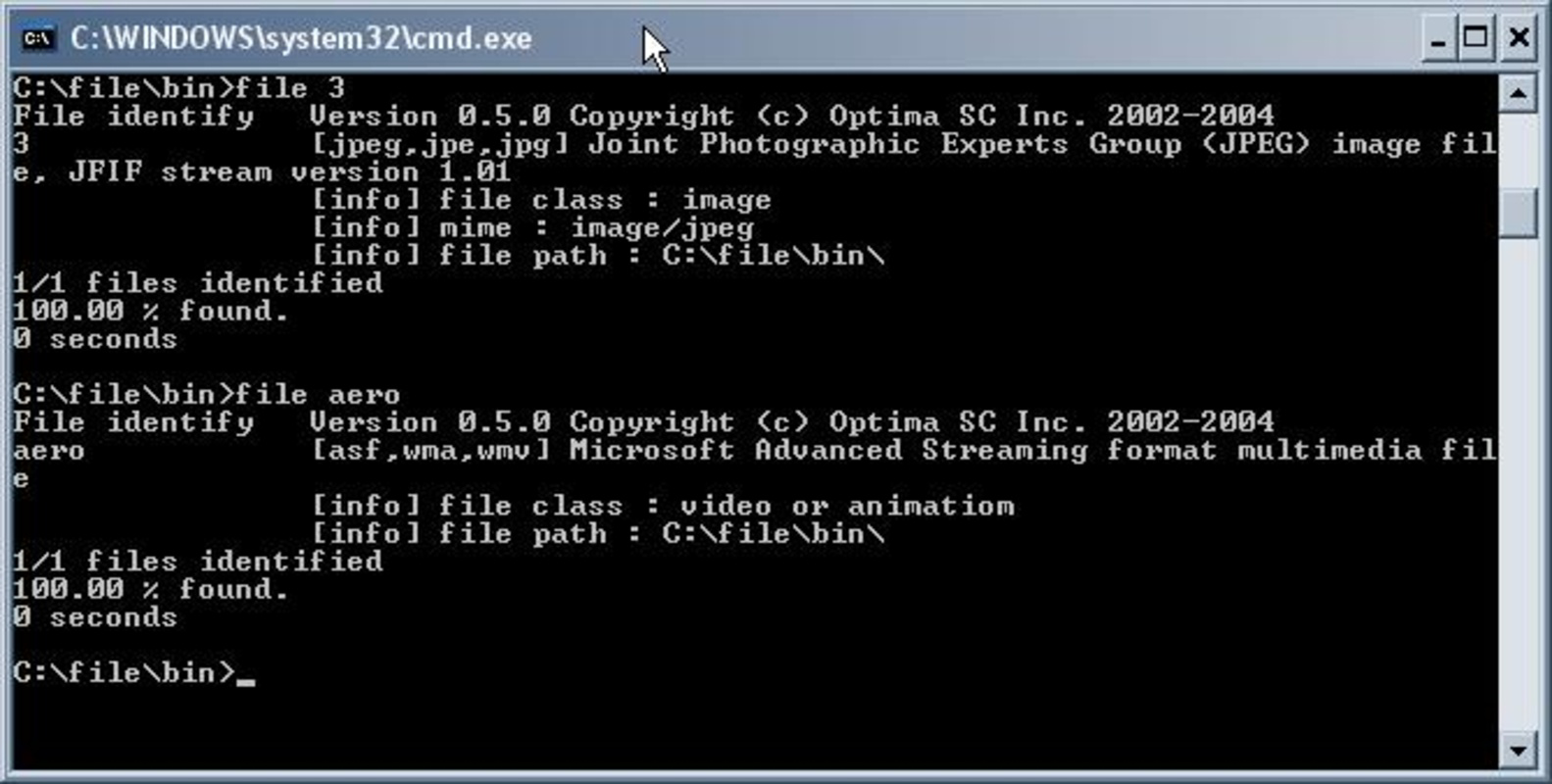
- Clear Output Results: Upon execution, the tool returns a clear, text-based response indicating the detected file type and its corresponding extension, helping users make informed decisions about which programs to use.
For example, a user receiving a file named data with no extension can use File Identifier to discover it is actually a .pdf or .jpg file. This insight prevents failed attempts to open the file with incompatible software and reduces time spent guessing. The tool is particularly useful in technical workflows where file accuracy is critical, such as digital archiving or software development.
Interface, UX & Performance
File Identifier features a minimalistic, text-based interface that relies entirely on command-line interaction. There is no graphical user interface, which means users must input commands manually through the command prompt or terminal. The navigation flow is linear: place files in the bin folder, open the command line, run the designated command, and review the output. While this may present a learning curve for non-technical users, it ensures that the tool remains lightweight and fast. The user experience is optimized for efficiency rather than visual engagement, catering to users who prioritize functionality over aesthetics. Although the developer did not list formal performance metrics, the application’s small size of 218 KB suggests low memory and CPU usage. It is expected to operate smoothly on older or low-resource Windows systems. Responsiveness is likely high due to the direct execution of system-level checks. Stability is implied by the tool’s long-standing presence since 2009, indicating consistent behavior over time. However, compatibility with modern Windows versions has not been explicitly confirmed.
Platform Compatibility & Technical Requirements
File Identifier is designed exclusively for the Windows platform. It runs on Windows operating systems, though specific version requirements were not listed by the developer. The application is distributed as a standalone executable package with a file size of 218 KB, making it suitable for storage on low-capacity devices. No additional dependencies or runtime environments are required for basic operation. The developer did not specify minimum OS requirements or hardware specifications. As such, users should exercise caution when deploying the tool on newer Windows versions, particularly those with enhanced security policies. The lack of a formal installation process means the app can be run directly from a USB drive or folder, enhancing portability. Compatibility with Windows 10, 11, or older versions like Windows 7 or XP remains unverified. Users are advised to test the tool in a controlled environment before relying on it for critical tasks.
Pros and Cons
Pros
- Free to download and use with no hidden costs.
- Extremely lightweight at only 218 KB.
- Operates without installation, enhancing portability.
- Provides accurate file type detection using system-level interpretation.
- Has been in use since 2009, indicating long-term stability.
Cons
- Lacks a graphical user interface, which may deter non-technical users.
- Requires command-line knowledge for operation.
- Compatibility with modern Windows versions is not confirmed.
- Developer did not provide detailed technical specifications.
- No automatic update mechanism or version tracking.
FAQ
Is File Identifier safe to download and use?
Yes, the application is free and does not contain malware. It operates locally on the user’s system and does not transmit data externally. However, users should only run it on files they trust.
Can I use File Identifier on Windows 10 or 11?
While the tool was released in 2009, it may function on Windows 10 and 11. However, the developer did not confirm compatibility with these systems. Testing in a secure environment is recommended.
Do I need to install File Identifier?
No. The application is portable and runs directly from the extracted folder. No installation or registry changes are required.
Is there a mobile version of File Identifier?
Currently, File Identifier is only available for Windows. There is no official mobile version for Android or iOS.
How do I update File Identifier?
The developer has not provided an update mechanism. Users must manually check for new versions if released.
Final Thoughts
File Identifier remains a niche but valuable tool for users who frequently deal with files lacking extensions. Its no-frills design, low resource consumption, and reliance on the Windows file interpreter make it a reliable choice for technical users seeking quick, accurate file identification. While its command-line interface limits accessibility for beginners, it offers unmatched efficiency for those comfortable with terminal commands. The tool’s enduring presence since 2009 speaks to its functionality and stability. For professionals in IT, digital forensics, or data management, this utility provides a practical solution to a persistent problem. If you’re a Windows user who values precision, speed, and simplicity, File Identifier delivers real value without unnecessary complexity. Download File Identifier now.
Guides & Tutorials for File Identifier
How to install File Identifier
- Click the Preview / Download button above.
- Once redirected, accept the terms and click Install.
- Wait for the File Identifier download to finish on your device.
How to use File Identifier
This software is primarily used for its core features described above. Open the app after installation to explore its capabilities.
User Reviews for File Identifier 0
No reviews found


